Azure VM でGitHub Actions self-hosted runners を構築する
今回はユーザー管理のAzure VM にGitHub Actions self-hosted runners を構築し、独自環境でGitHub Actions のジョブを実行する方法について説明します。本記事はエーピーコミュニケーションズ Advent Calendar 2024 16日目の記事となります。

 16 December, 2024
実施環境
| OS/ツール | バージョン |
|---|---|
| Azure VM OS | Ubuntu-24.04 LTS |
| Azure CLI | 2.67.0 |
| GitHub CLI | 2.63.1 |
| runner package | 2.321.0 |
前提条件
- GitHub Free プランのGitHub アカウントがあること
- Azure のアカウント、サブスクリプションがあること
- WSL 上でAzure CLI およびGitHub CLI の実行環境があること
GitHub Actions self-hosted runners とは
概要
GitHub Actions self-hosted runners はユーザー所有のマシンを利用し、GitHub Actions のジョブを実行するシステムです。GitHub Actions でジョブを実行する場合、GitHub 上のホストから実行する方法とユーザー所有のマシンから実行する方法があります。GitHub 上のホストではユーザーがジョブ実行環境を管理しなくて良いメリットなどがあります。しかし、マシンのスペックに制約がある、CI/CD パイプラインの実行環境を細かくカスタマイズ・制御したい、GitHub Actions の実行時間による料金、などGitHub 上のホストには課題もあります。GitHub Actions self-hosted runners はユーザー所有のマシンを利用するため、マシンスペックをカスタマイズできることによるパフォーマンス向上、システムに合わせた細かなカスタマイズ、実行時間による料金の課題を解消できます。
ただし、GitHub Actions self-hosted runners ではユーザー所有のマシンを利用するため、self-hosted runners 用マシンの運用・管理が発生します。また、クラウド上でマシンを管理する場合はクラウドの利用料も発生するため、チームの開発環境
GitHub 上で実行するGitHub ホスト型とユーザーのマシンに導入するself-hosted の違いは以下の通りです。
| GitHub ホスト型ランナー | self-hosted ランナー | |
|---|---|---|
| パッケージ、アップデート | プリインストールされたパッケージとツール、アプリケーションの自動更新を受け取れる。 | アプリケーションの自動更新のみ受け取る。自動更新の無効化も可能。 |
| マシンのカスタマイズ | GitHub 側でインスタンスを用意するため、ハードウェア、OS、ソフトウェアなどカスタマイズできない箇所がある。 | ユーザー管理のマシンを利用するため、ハードウェア、OS、ソフトウェア、セキュリティ要件に合わせてカスタマイズが可能。 |
| マシンの管理 | GitHub 管理 | ユーザー管理 |
| ジョブの実行環境 | 全てのジョブでクリーンなインスタンスとなる。 | ジョブ実行ごとにインスタンスを用意しなくてよい。ただし実行後も環境が残るため、クリーンアップする場合は後処理が必要。 |
| 料金 | GitHub プランの無料分で利用可能。無料分を超えた場合、1分当たりの料金が課金される。 | GitHub Actions は無料で利用可能。ランナー用のマシンはユーザー負担となる。 |
GitHub Actions ではリポジトリ、組織、エンタープライズと階層ごとのランナーを追加できます。リポジトリレベルのランナーは単一のリポジトリのみランナーを実行でき、組織レベルのランナーは組織内の複数リポジトリでランナーを実行できます。エンタープライズレベルのランナーは複数の組織にランナーの割り当てが可能です。
self-hosted runners の導入は各OS のマシンにパッケージをダウンロードしインストールします。対応するOS は以下リンクより確認できます。
Supported architectures and operating systems for self-hosted runners
self-hosted runners ではユーザー所有のマシンとGitHub Actions の間で通信が発生します。通信要件は以下リンクより確認できます。
Communication between self-hosted runners and GitHub
GitHub Actions self-hosted runners には注意点があります。self-hosted runners は14日以上GitHub Actions に接続していない場合、GitHub から自動的に削除されます。一時的なself-hosted runners は1日以上GitHub Actions に接続が必要となります。そのため、self-hosted runners は定期的にGitHub Actions への接続が必要となるため、間が空いてジョブを実行した時にランナーが無い、とならないよう注意が必要です。
今回の構成
今回はリソースグループでサービス用リソースとCI/CD 用リソースを分割した構成とします。サービス用VM はcloud-init を用いApache を導入します。GitHub Actions self-hosted runners 用のVM はAzure Bastion から構築を行います。
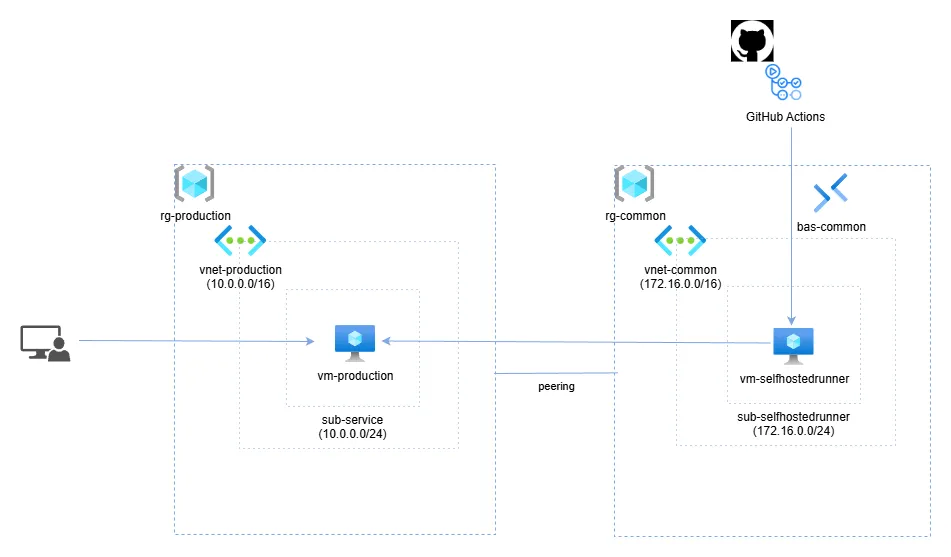
Bicep のディレクトリ構成は以下となります。今回はGitHub Actions self-hosted runners とサービスを区別しやすくするため、self-hosted runners はcommon.bicep、サービス用のBicep ファイルはservice.bicep とします。
/
└  selfhostedrunners
   ├ cloud-init
   │  ├ common.txt
   │  └ service.txt
   ├ parameters
   │  ├ common.bicepparam
   │  └ production.bicepparam
   ├ common.bicep
   └ service.bicep
今回Azure リソース構築に利用したBicep のサンプルはGitHub 上で公開しています。
https://github.com/kdkwakaba/BicepSample/tree/main/selfhostedrunners
GitHub Actions self-hosted runners の準備
初めに、GitHub にプライベートリポジトリを作成します。
# GitHubにログインする
gh auth login

# プライベートリポジトリを作成する
gh repo create selfhostedrunners-test --description 'GitHub Actions self-hosted runners のテストです。' --private --default-branch main
リポジトリ作成後、ブラウザから該当リポジトリの「Setting > Actions > Runners」を選択します。選択後、右上の「New self-hosted runner」を選択し、対象OS とアーキテクチャーを指定します。画面は今回作成するUbuntu 用のものとなります。
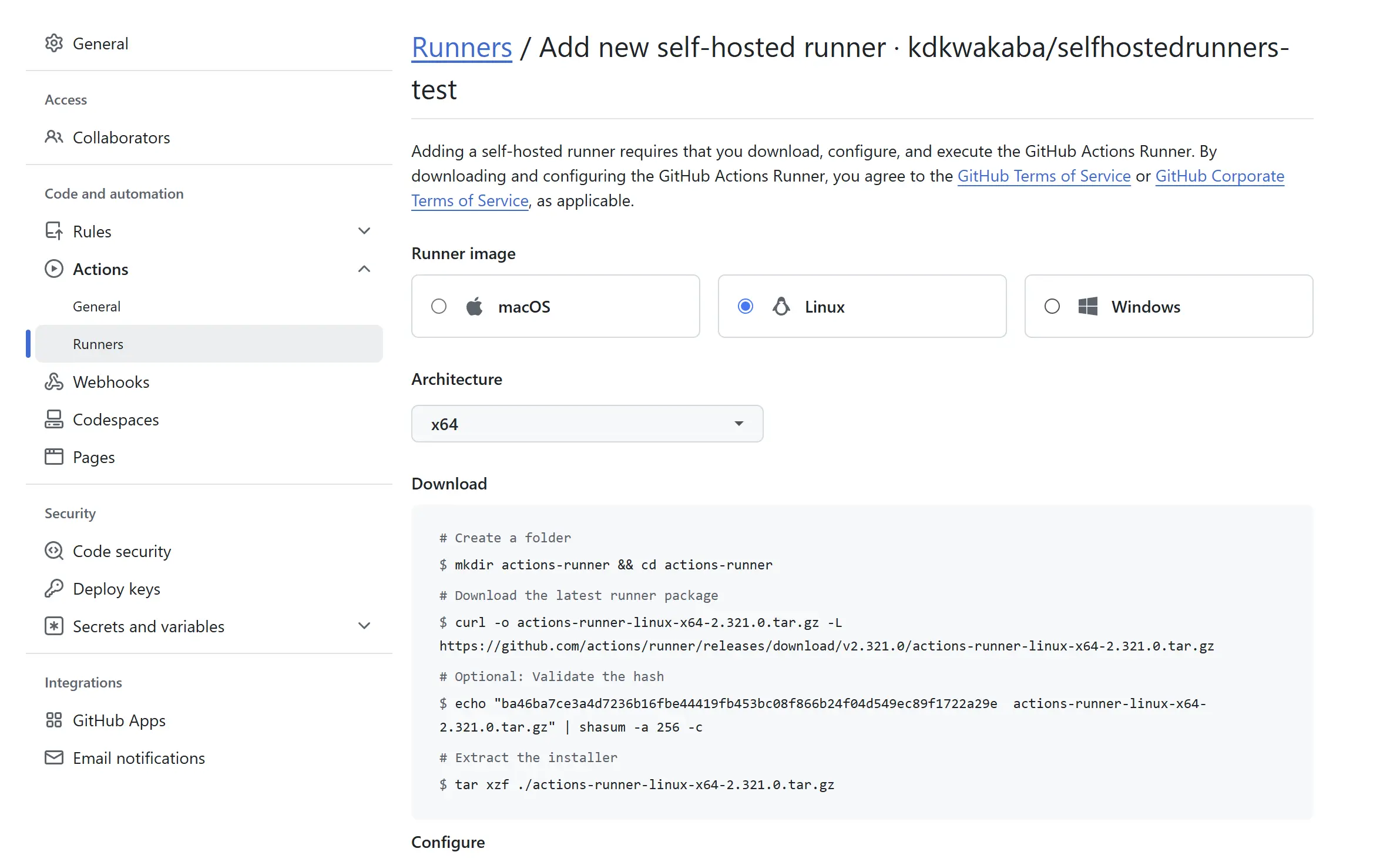
入力後、self-hosted runner のダウンロードコマンドが表示されるため、こちらに沿って作業を実施します。
GitHub Actions self-hosted runners 用VM および環境の作成
self-hosted runners 用のリポジトリなどの準備後、Azure 上にself-hosted runners 用の環境を作成します。今回はBicep を利用し作成を行います。Bicep はテンプレートファイルとパラメーターファイルの2つを利用し、一部リソースを除きAzure Verified Modules を使い作成します。
初めに、self-hosted runners とサービス用VM を接続するためSSH キーを作成します。self-hosted runners 用VM では秘密鍵を利用し、サービス用VM では公開鍵を利用します。SSH キー作成時にパスワードを問われますが、パスワードは設定せず作成します。
# SSHキーを作成します
ssh-keygen -t ed25519 -b 4096
SSH キー作成後、Bicep テンプレートファイルとパラメーターファイルを準備します。今回はself-hosted runners の動作確認を目的としているため、パラメーターファイルでパスワードをハードコードしていますが、実務などではGitHub のシークレットに格納するなど対策をしてください。
using '../common.bicep'

@description('Azureリソースのリージョン')
param location = 'japaneast'

@description('リソースグループ名')
param resourceGroupName = 'rg-commonresource'

@description('環境名')
param environemtName = 'commonresource'

@description('GitHub Actions self-hosted runnersのネットワークセキュリティグループ名')
param networkSecurityGroupName = 'nsg-selfhostedrunners'

@description('GitHub Actions self-hosted runnersのセキュリティルール')
param runnersNetworkSecurityRules = [
  {
    name: 'AllowVnetOutBoundOverwrite'
    properties: {
      protocol: 'Tcp'
      sourcePortRange: '*'
      destinationPortRange: '443'
      sourceAddressPrefix: '*'
      destinationAddressPrefix: 'VirtualNetwork'
      access: 'Allow'
      priority: 200
      direction: 'Outbound'
      destinationAddressPrefixes: []
    }
  }
  {
    name: 'AllowOutBoundActions'
    properties: {
      protocol: '*'
      sourcePortRange: '*'
      destinationPortRange: '*'
      sourceAddressPrefix: '*'
      access: 'Allow'
      priority: 210
      direction: 'Outbound'
      destinationAddressPrefixes: [
        '4.175.114.51/32'
        '20.102.35.120/32'
        '4.175.114.43/32'
        '20.72.125.48/32'
        '20.19.5.100/32'
        '20.7.92.46/32'
        '20.232.252.48/32'
        '52.186.44.51/32'
        '20.22.98.201/32'
        '20.246.184.240/32'
        '20.96.133.71/32'
        '20.253.2.203/32'
        '20.102.39.220/32'
        '20.81.127.181/32'
        '52.148.30.208/32'
        '20.14.42.190/32'
        '20.85.159.192/32'
        '52.224.205.173/32'
        '20.118.176.156/32'
        '20.236.207.188/32'
        '20.242.161.191/32'
        '20.166.216.139/32'
        '20.253.126.26/32'
        '52.152.245.137/32'
        '40.118.236.116/32'
        '20.185.75.138/32'
        '20.96.226.211/32'
        '52.167.78.33/32'
        '20.105.13.142/32'
        '20.253.95.3/32'
        '20.221.96.90/32'
        '51.138.235.85/32'
        '52.186.47.208/32'
        '20.7.220.66/32'
        '20.75.4.210/32'
        '20.120.75.171/32'
        '20.98.183.48/32'
        '20.84.200.15/32'
        '20.14.235.135/32'
        '20.10.226.54/32'
        '20.22.166.15/32'
        '20.65.21.88/32'
        '20.102.36.236/32'
        '20.124.56.57/32'
        '20.94.100.174/32'
        '20.102.166.33/32'
        '20.31.193.160/32'
        '20.232.77.7/32'
        '20.102.38.122/32'
        '20.102.39.57/32'
        '20.85.108.33/32'
        '40.88.240.168/32'
        '20.69.187.19/32'
        '20.246.192.124/32'
        '20.4.161.108/32'
        '20.22.22.84/32'
        '20.1.250.47/32'
        '20.237.33.78/32'
        '20.242.179.206/32'
        '40.88.239.133/32'
        '20.121.247.125/32'
        '20.106.107.180/32'
        '20.22.118.40/32'
        '20.15.240.48/32'
        '20.84.218.150/32'
      ]
    }
  }
  {
    name: 'AllowOutBoundGitHub'
    properties: {
      protocol: '*'
      sourcePortRange: '*'
      destinationPortRange: '*'
      sourceAddressPrefix: '*'
      access: 'Allow'
      priority: 220
      direction: 'Outbound'
      destinationAddressPrefixes: [
        '140.82.112.0/20'
        '143.55.64.0/20'
        '185.199.108.0/22'
        '192.30.252.0/22'
        '20.175.192.146/32'
        '20.175.192.147/32'
        '20.175.192.149/32'
        '20.175.192.150/32'
        '20.199.39.227/32'
        '20.199.39.228/32'
        '20.199.39.231/32'
        '20.199.39.232/32'
        '20.200.245.241/32'
        '20.200.245.245/32'
        '20.200.245.246/32'
        '20.200.245.247/32'
        '20.200.245.248/32'
        '20.201.28.144/32'
        '20.201.28.148/32'
        '20.201.28.149/32'
        '20.201.28.151/32'
        '20.201.28.152/32'
        '20.205.243.160/32'
        '20.205.243.164/32'
        '20.205.243.165/32'
        '20.205.243.166/32'
        '20.205.243.168/32'
        '20.207.73.82/32'
        '20.207.73.83/32'
        '20.207.73.85/32'
        '20.207.73.86/32'
        '20.207.73.88/32'
        '20.217.135.1/32'
        '20.233.83.145/32'
        '20.233.83.146/32'
        '20.233.83.147/32'
        '20.233.83.149/32'
        '20.233.83.150/32'
        '20.248.137.48/32'
        '20.248.137.49/32'
        '20.248.137.50/32'
        '20.248.137.52/32'
        '20.248.137.55/32'
        '20.26.156.215/32'
        '20.26.156.216/32'
        '20.26.156.211/32'
        '20.27.177.113/32'
        '20.27.177.114/32'
        '20.27.177.116/32'
        '20.27.177.117/32'
        '20.27.177.118/32'
        '20.29.134.17/32'
        '20.29.134.18/32'
        '20.29.134.19/32'
        '20.29.134.23/32'
        '20.29.134.24/32'
        '20.87.245.0/32'
        '20.87.245.1/32'
        '20.87.245.4/32'
        '20.87.245.6/32'
        '20.87.245.7/32'
        '4.208.26.196/32'
        '4.208.26.197/32'
        '4.208.26.198/32'
        '4.208.26.199/32'
        '4.208.26.200/32'
        '4.225.11.196/32'
        '4.237.22.32/32'
      ]
    }
  }
  {
    name: 'AllowStorageOutbound'
    properties: {
      protocol: '*'
      sourcePortRange: '*'
      destinationPortRange: '*'
      sourceAddressPrefix: '*'
      destinationAddressPrefix: 'Storage'
      access: 'Allow'
      priority: 230
      direction: 'Outbound'
      destinationAddressPrefixes: []
    }
  }
  {
    name: 'AllowSSHOutbound'
    properties: {
      protocol: 'Tcp'
      sourcePortRange: '*'
      destinationPortRange: '22'
      sourceAddressPrefix: '*'
      destinationAddressPrefix: '10.0.0.4'
      access: 'Allow'
      priority: 300
      direction: 'Outbound'
      destinationAddressPrefixes: []
    }
  }
]

@description('仮想ネットワーク名')
param virtualNetworkName = 'vnet-commonresource'

@description('仮想ネットワークのアドレス空間')
param virtualNetworkAddressPrefix = '172.16.0.0/16'

@description('GitHub Actions self-hosted runnersのサブネット名')
param runnersSubnetName = 'sub-selfhostedrunners'

@description('GitHub Actions self-hosted runnersのサブネットのアドレス空間')
param runnersSubnetAddressPrefix = '172.16.0.0/24'

@description('Azure Bastionのサブネットのアドレス空間')
param bastionSubnetAddressPrefix = '172.16.10.0/26'

@description('Azure Bastion名')
param bastionName = 'bas-commonresource'

@description('Azure BastionのSKU名')
param bastionSkuName = 'Basic'

@description('仮想マシン名')
param virtualMachineName = 'vm-selfhostedrunners'

@description('仮想マシンの管理者ユーザー名')
param adminUserName = 'azureuser'

@description('仮想マシンの管理者パスワード')
param adminUserPassword = '<任意のパスワード>'

@description('仮想マシンのネットワークインターフェース')
param virtualNetworkInterfaceName = 'nic-selfhostedrunners'

@description('仮想マシンのネットワークインターフェースのプライベートIPアドレス')
param virtualNetworkInterfacePrivateIpAddress = '172.16.0.4'
targetScope = 'subscription'

@description('Azureリソースのリージョン')
param location string

@description('リソースグループ名')
param resourceGroupName string

@description('環境名')
param environemtName string

@description('GitHub Actions self-hosted runnersのネットワークセキュリティグループ名')
param networkSecurityGroupName string

@description('GitHub Actions self-hosted runnersのセキュリティルール')
param runnersNetworkSecurityRules array

@description('仮想ネットワーク名')
param virtualNetworkName string

@description('仮想ネットワークのアドレス空間')
param virtualNetworkAddressPrefix string

@description('GitHub Actions self-hosted runnersのサブネット名')
param runnersSubnetName string

@description('GitHub Actions self-hosted runnersのサブネットのアドレス空間')
param runnersSubnetAddressPrefix string

@description('Azure Bastionのサブネットのアドレス空間')
param bastionSubnetAddressPrefix string

@description('Azure Bastion名')
param bastionName string

@description('Azure BastionのSKU名')
param bastionSkuName string

//@description('Azure BastionのパブリックIPアドレス名')
//param bastionPublicIpAddresName string

@description('仮想マシン名')
param virtualMachineName string

@description('仮想マシンの管理者ユーザー名')
param adminUserName string

@secure()
@description('仮想マシンの管理者パスワード。Bicep実行時に設定する')
param adminUserPassword string

@description('仮想マシンのネットワークインターフェース')
param virtualNetworkInterfaceName string

@description('仮想マシンのネットワークインターフェースのプライベートIPアドレス')
param virtualNetworkInterfacePrivateIpAddress string

@description('初期設定用のcloud-init')
var virtualMachineCustomData = loadTextContent('cloud-init/common.txt')

// リソースグループの作成
module rg 'br/public:avm/res/resources/resource-group:0.4.0' = {

  name: resourceGroupName
  params: {
    name: resourceGroupName
    location: location
    tags: {
      environment: environemtName
    }
  }
}

// NSGの作成
module nsg 'br/public:avm/res/network/network-security-group:0.5.0' = {
  scope: resourceGroup(resourceGroupName)
  name: networkSecurityGroupName
  dependsOn: [
    rg
  ]
  params: {
    name: networkSecurityGroupName
    securityRules: runnersNetworkSecurityRules
    tags: {
      environment: environemtName
    }
  }
}

// 仮想ネットワークの作成
module vnet 'br/public:avm/res/network/virtual-network:0.5.1' = {
  scope: resourceGroup(resourceGroupName)
  name: virtualNetworkName
  dependsOn: [
    rg
  ]
  params: {
    name: virtualNetworkName
    addressPrefixes: [
      virtualNetworkAddressPrefix
    ]
    subnets: [
      {
        name: runnersSubnetName
        addressPrefix: runnersSubnetAddressPrefix
      }
      {
        name: 'AzureBastionSubnet'
        addressPrefix: bastionSubnetAddressPrefix
      }
    ]
    tags: {
      environment: environemtName
    }
  }
}

resource existingVirtualNetwork 'Microsoft.Network/virtualNetworks@2024-05-01' existing = {
  scope: resourceGroup(resourceGroupName)
  name: virtualNetworkName

  resource subnet 'subnets@2024-05-01' existing = {
    name: runnersSubnetName
  }
}

// Azure Bastionの作成
module bastion 'br/public:avm/res/network/bastion-host:0.5.0' = {
  scope: resourceGroup(resourceGroupName)
  name: bastionName
  dependsOn: [
    rg
  ]
  params: {
    name: bastionName
    skuName: bastionSkuName
    virtualNetworkResourceId: vnet.outputs.resourceId
    tags: {
      environment: environemtName
    }

  }
}

// GitHub Actions self-hosted runners用仮想マシンの作成
module selfhostedrunnersvm 'br/public:avm/res/compute/virtual-machine:0.10.1' = {
  scope: resourceGroup(resourceGroupName)
  name: virtualMachineName
  dependsOn: [
    rg
    vnet
  ]
  params: {
    name: virtualMachineName
    adminUsername: adminUserName
    adminPassword: adminUserPassword
    customData: virtualMachineCustomData
    imageReference: {
      offer: 'ubuntu-24_04-lts'
      publisher: 'canonical'
      sku: 'server'
      version: 'latest'
    }
    nicConfigurations: [
      {
        name: virtualNetworkInterfaceName
        ipConfigurations: [
          {
            name: 'ipconfig01'
            subnetResourceId: existingVirtualNetwork::subnet.id
            privateIPAddress: virtualNetworkInterfacePrivateIpAddress
          }
        ]
        nicSuffix: ''
      }
    ]
    osDisk: {
      caching: 'ReadWrite'
      diskSizeGB: 128
      managedDisk: {
        storageAccountType:'Standard_LRS'
      }
    }
    osType: 'Linux'
    vmSize: 'Standard_D2s_v3'
    securityType: ''
    encryptionAtHost: false
    zone: 0
    tags: {
      environment: environemtName
    }
  }
}
#cloud-config
timezone: Asia/Tokyo
locale: ja_JP.utf8

runcmd:
  - echo 'Host 10.0.0.4\n    StrictHostKeyChecking no\n    UserKnownHostsFile=/dev/null' >> /home/azureuser/.ssh/config
Bicep テンプレートファイルとパラメーターファイル、cloud-init の準備後、Azure リソースを作成します。
# 実行前確認をする
az deployment sub what-if -l japaneast -f common.bicep -p parameters/common.bicepparam

# BicepでGitHub Actions self-hosted runners環境を作成する
az deployment sub create -l japaneast -f common.bicep -p parameters/common.bicepparam
Azure リソース作成後、仮想ネットワークのリソースID を取得します。こちらはサービス用Azure 環境作成時に利用するためメモしておきます。
# 仮想ネットワークのリソースIDを取得する
az network vnet show --resource-group rg-commonresource --name vnet-commonresource --query id --output tsv
仮想ネットワークのリソースID 取得後、Azure Bastion よりVM にログインします。ログイン後、SSH 秘密鍵の文字列を使いファイルを作成します (Bicep のcloud-init 処理がうまくいかないため、手動で対応しています)
# ユーザー配下にSSH秘密鍵を作成する
# 秘密鍵内の文字列をそのままコピーする
cat > .ssh/id_ed25519 <<EOF
<秘密鍵の文字列>
EOF

# 秘密鍵ファイルの権限を変更する
chmod 600 .ssh/id_ed25519
秘密鍵の準備後、self-hosted runners の設定用、実行用スクリプトをダウンロードします。GitHub 上で表示したコマンドをそのまま実行します。
# actions-runnerディレクトリを作成する
mkdir actions-runner && cd actions-runner

# 最新のrunnerパッケージをダウンロードする
curl -o actions-runner-linux-x64-2.321.0.tar.gz -L https://github.com/actions/runner/releases/download/v2.321.0/actions-runner-linux-x64-2.321.0.tar.gz

# パッケージのハッシュ値を確認する
echo "ba46ba7ce3a4d7236b16fbe44419fb453bc08f866b24f04d549ec89f1722a29e  actions-runner-linux-x64-2.321.0.tar.gz" | shasum -a 256 -c

# インストーラーを展開する
tar xzf ./actions-runner-linux-x64-2.321.0.tar.gz
パッケージのインストール後、初期設定を行います。リポジトリ名、トークンは各環境ごとに異なる文字列が設定されるため、環境に合わせて置き換えてください。今回はリポジトリをselfhostedrunners-test とします。
# self-hosted runnersの初期設定をする
./config.sh --url https://github.com/<組織名>/selfhostedrunners-test --token <tokenの文字列>
初期設定では以下の内容を問われるため、環境に合わせて入力します。入力後「Settings Saved.」と表示されることを確認します。
- 今回追加するrunner group (特に無ければDefault のままとする)
- runner 名
- runner のラベル
- runner のワークディレクトリ
初期設定後、self-hosted runners をサービスとして起動させるためsvc をインストールします。インストール後はサービスに登録します。この作業を実施しない場合、手動で run.sh を実行しプロセスを起動した状態にする必要があります。
# svcをインストールする
sudo ./svc.sh install

# svcサービスを起動する
sudo ./svc.sh start
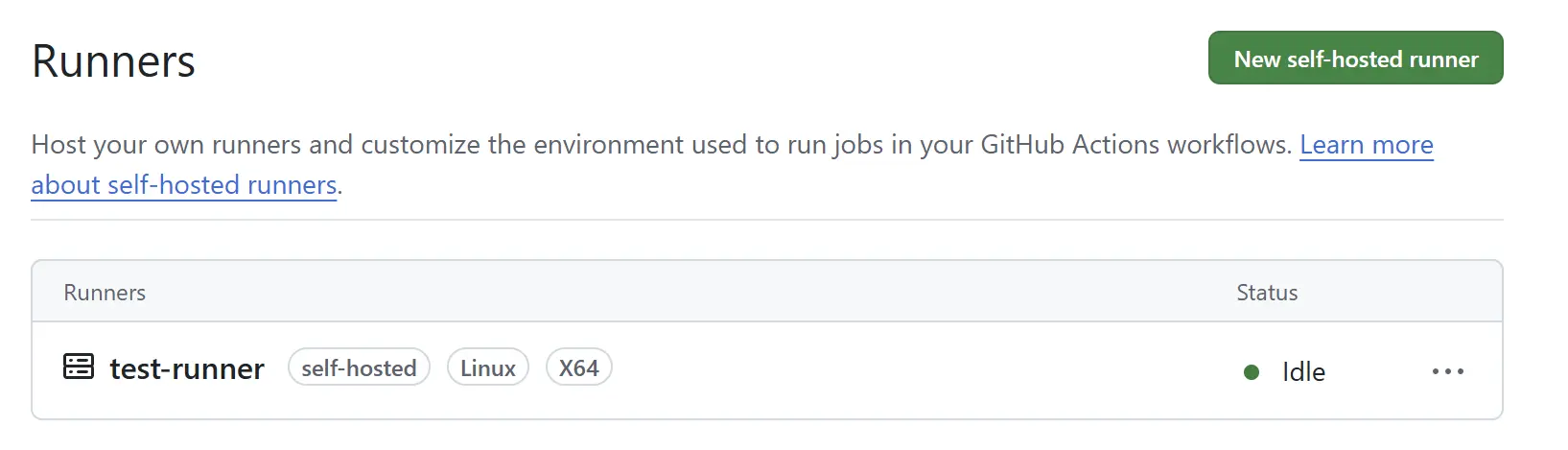
サービス起動後、GitHub 上の画面でself-hosted runners の表示、起動を確認します。Status がIdle であれば接続ができています。
サービス用のAzure 環境作成
self-hosted runners 用リソース作成後、サービス用のAzure 環境を作成します。初めにサービス用のAzure 環境を以下のBicep およびBicep パラメーターファイル、cloud-init で作成します。今回はself-hosted runners の動作を主目的とするため、ローカルPC 上のSSH キーの文字列をパラメーターファイルにハードコードしていますが、CI/CD などで実行する場合はGitHub のSecret を利用するなど対策してください。
using '../service.bicep'

@description('Azureリソースのリージョン')
param location = 'japaneast'

@description('リソースグループ名')
param resourceGroupName = 'rg-production'

@description('環境名')
param environemtName = 'production'

@description('サービスのネットワークセキュリティグループ名')
param networkSecurityGroupName = 'nsg-production'

@description('サービスのセキュリティルール')
param serviceNetworkSecurityRules = [
  {
    name: 'AllowHTTPInbound'
    properties: {
      protocol: 'Tcp'
      sourcePortRange: '*'
      destinationPortRange: '80'
      sourceAddressPrefix: '*'
      destinationAddressPrefix: '*'
      access: 'Allow'
      priority: 200
      direction: 'Inbound'
      destinationAddressPrefixes: []
    }
  }
  {
    name: 'AllowSSHInbound'
    properties: {
      protocol: 'Tcp'
      sourcePortRange: '*'
      destinationPortRange: '22'
      sourceAddressPrefix: '*'
      destinationAddressPrefix: '172.16.0.4'
      access: 'Allow'
      priority: 300
      direction: 'Inbound'
      destinationAddressPrefixes: []
    }
  }
]

@description('仮想ネットワーク名')
param virtualNetworkName = 'vnet-production'

@description('仮想ネットワークのアドレス空間')
param virtualNetworkAddressPrefix = '10.0.0.0/16'

@description('サービスのサブネット名')
param serviceSubnetName = 'sub-service'

@description('サービスのサブネットのアドレス空間')
param serviceSubnetAddressPrefix = '10.0.0.0/24'

@description('仮想ネットワークピアリング名')
param serviceVirtualNetworkPeeringName = 'ServiceToRunner'

@description('仮想ネットワークピアリングの仮想ネットワーク')
param serviceVirtualNetworkPeeringDestination = '<仮想ネットワークのリソースID>'

@description('パブリックIPアドレス名')
param servicePublicIpAddressName = 'pip-production'

@description('仮想マシン名')
param virtualMachineName = 'vm-production'

@description('仮想マシンの管理者ユーザー名')
param adminUserName = 'azureuser'

@secure()
@description('仮想マシンの管理者パスワード')
param adminUserPassword = '<任意のパスワード>'

@description('仮想マシンのネットワークインターフェース')
param virtualNetworkInterfaceName = 'nic-production'

@description('仮想マシンのネットワークインターフェースのプライベートIPアドレス')
param virtualNetworkInterfacePrivateIpAddress = '10.0.0.4'

@description('仮想マシンのSSH公開鍵')
param virtualMachineSSHPublicKey = '<SSH公開鍵の文字列>'

targetScope = 'subscription'

@description('Azureリソースのリージョン')
param location string

@description('リソースグループ名')
param resourceGroupName string

@description('環境名')
param environemtName string

@description('サービスのネットワークセキュリティグループ名')
param networkSecurityGroupName string

@description('サービスのセキュリティルール')
param serviceNetworkSecurityRules array

@description('仮想ネットワーク名')
param virtualNetworkName string

@description('仮想ネットワークのアドレス空間')
param virtualNetworkAddressPrefix string

@description('サービスのサブネット名')
param serviceSubnetName string

@description('サービスのサブネットのアドレス空間')
param serviceSubnetAddressPrefix string

@description('仮想ネットワークピアリング名')
param serviceVirtualNetworkPeeringName string

@description('仮想ネットワークピアリングの仮想ネットワーク')
param serviceVirtualNetworkPeeringDestination string

@description('パブリックIPアドレス名')
param servicePublicIpAddressName string

@description('仮想マシン名')
param virtualMachineName string

@description('仮想マシンの管理者ユーザー名')
param adminUserName string

@secure()
@description('仮想マシンの管理者パスワード。Bicep実行時に設定する')
param adminUserPassword string

@description('仮想マシンのネットワークインターフェース')
param virtualNetworkInterfaceName string

@description('仮想マシンのネットワークインターフェースのプライベートIPアドレス')
param virtualNetworkInterfacePrivateIpAddress string

@description('仮想マシンのSSH公開鍵')
param virtualMachineSSHPublicKey string

@description('初期設定用のcloud-init')
var virtualMachineCustomData = loadTextContent('cloud-init/service.txt')

// リソースグループの作成
module rg 'br/public:avm/res/resources/resource-group:0.4.0' = {
  scope: subscription()
  name: resourceGroupName
  params: {
    name: resourceGroupName
    location: location
    tags: {
      environment: environemtName
    }
  }
}

// NSGの作成
module nsg 'br/public:avm/res/network/network-security-group:0.5.0' = {
  scope: resourceGroup(resourceGroupName)
  name: networkSecurityGroupName
  dependsOn: [
    rg
  ]
  params: {
    name: networkSecurityGroupName
    securityRules: serviceNetworkSecurityRules
    tags: {
      environment: environemtName
    }
  }
}

// 仮想ネットワークの作成
module vnet 'br/public:avm/res/network/virtual-network:0.5.1' = {
  scope: resourceGroup(resourceGroupName)
  name: virtualNetworkName
  dependsOn: [
    rg
  ]
  params: {
    name: virtualNetworkName
    addressPrefixes: [
      virtualNetworkAddressPrefix
    ]
    subnets: [
      {
        name: serviceSubnetName
        addressPrefix: serviceSubnetAddressPrefix
        networkSecurityGroupResourceId: nsg.outputs.resourceId
      }
    ]
    peerings: [
      {
        allowForwardedTraffic: true
        allowGatewayTransit: false
        allowVirtualNetworkAccess: true
        remotePeeringAllowForwardedTraffic: true
        remotePeeringAllowVirtualNetworkAccess: true
        remotePeeringEnabled: true
        remotePeeringName: serviceVirtualNetworkPeeringName
        remoteVirtualNetworkResourceId: serviceVirtualNetworkPeeringDestination
        useRemoteGateways: false
      }
    ]
    tags: {
      environment: environemtName
    }
  }
}

resource existingVirtualNetwork 'Microsoft.Network/virtualNetworks@2024-05-01' existing = {
  scope: resourceGroup(resourceGroupName)
  name: virtualNetworkName

  resource subnet 'subnets@2024-05-01' existing = {
    name: serviceSubnetName
  }
}

// サービス用仮想マシンの作成
module selfhostedrunnersvm 'br/public:avm/res/compute/virtual-machine:0.10.1' = {
  scope: resourceGroup(resourceGroupName)
  name: virtualMachineName
  dependsOn: [
    rg
    vnet
  ]
  params: {
    name: virtualMachineName
    adminUsername: adminUserName
    adminPassword: adminUserPassword
    customData: virtualMachineCustomData
    imageReference: {
      offer: 'ubuntu-24_04-lts'
      publisher: 'canonical'
      sku: 'server'
      version: 'latest'
    }
    nicConfigurations: [
      {
        name: virtualNetworkInterfaceName
        ipConfigurations: [
          {
            name: 'ipconfig01'
            subnetResourceId: existingVirtualNetwork::subnet.id
            pipConfiguration: {
              name: servicePublicIpAddressName
              tags: {
                environment: environemtName
              }
            }
            privateIPAddress: virtualNetworkInterfacePrivateIpAddress
          }
        ]
        nicSuffix: ''
      }
    ]
    osDisk: {
      caching: 'ReadWrite'
      diskSizeGB: 128
      managedDisk: {
        storageAccountType:'Standard_LRS'
      }
    }
    osType: 'Linux'
    vmSize: 'Standard_D2s_v3'
    securityType: ''
    encryptionAtHost: false
    zone: 0
    publicKeys: [
      {
        keyData: virtualMachineSSHPublicKey
        path: '/home/azureuser/.ssh/authorized_keys'
      }
    ]
    tags: {
      environment: environemtName
    }
  }
}
#cloud-config
timezone: Asia/Tokyo
locale: ja_JP.utf8
package_update: true
package_upgrade: true
packages:
  - apache2

runcmd:
  - systemctl start apache2
  - systemctl enable apache2
  - chown -R azureuser:azureuser /var/www/html
Bicep テンプレートファイルとパラメーターファイル、cloud-init の準備後、Azure リソースを作成します。
# 実行前確認をする
az deployment sub what-if -l japaneast -f service.bicep -p parameters/service.bicepparam

# BicepでGitHub Actions self-hosted runners環境を作成する
az deployment sub create -l japaneast -f service.bicep -p parameters/service.bicepparam
サービス用リソースはこれで完了となります。サービス用VM にApache が導入されたかを確認したい場合はサービス用VM のパブリックIP アドレスでアクセスし、Apache のデフォルトページが表示されることを確認してください。
GitHub Actions ワークフローファイルの作成、動作確認
GitHub Actions self-hosted runners の準備ができたら、GitHub Actions のワークフローファイル、デプロイ用のHTML ファイルを作成します。GitHub Actions でself-hosted runners を利用する場合、runs-on で self-hosted を指定します。
name: GitHub Actions Test
run-name: GitHub Actions test

on:
  push

jobs:
  self-hostedrunnerstest:
    runs-on: self-hosted
    steps:
      - name: Checkout repository content
        uses: actions/checkout@v4

      - name: File transfer with scp
        run: scp index.html azureuser@1<サービス用VMのプライベートIPアドレス>:/var/www/html/index.html
<!DOCTYPE html>
<html lang="ja">
<head>
    <meta charset="UTF-8">
    <meta name="viewport" content="width=device-width, initial-scale=1.0">
    <title>GitHub Actions self-hosted runners テスト</title>
</head>
<body>
    <h1>GitHub Actions self-hosted runners テスト</h1>
    <p>これはGitHub Actions self-hosted runners の実行テストです。</p>
</body>
</html>
GitHub のリポジトリ構成は以下のとおりになります。
/
├ .github
│ └ workflows
│    └ production.yaml
└ index.html
GitHub Actions ワークフローファイルとHTML ファイルの準備後、これらのファイルをself-hosted runners 用リポジトリにプッシュします。プッシュ後、GitHub Actions のワークフローが実行されるため、実行結果が成功であることを確認します。

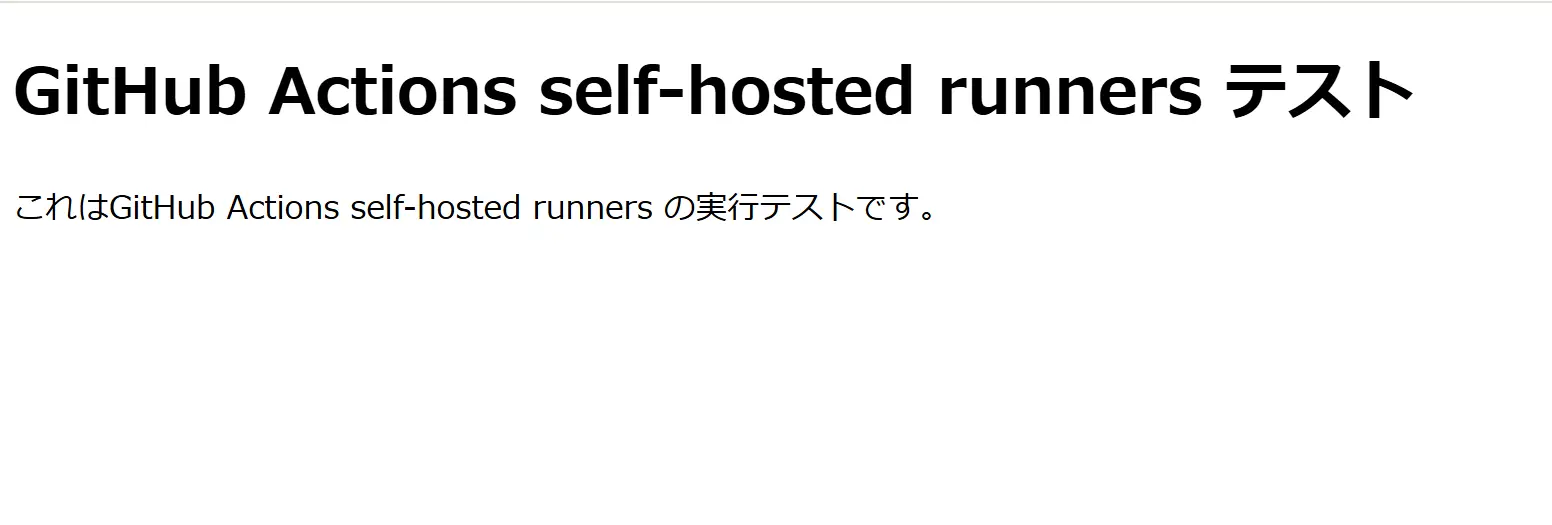
実行後、サービス用VM のパブリックIP アドレスにアクセスし、デプロイしたHTML ファイルが表示されることを確認します。
リソースのクリーンアップ
動作確認後、Azure リソースをクリーンアップします。
# リソースグループを削除する
az group delete --name rg-production
az group delete --name rg-commonresource
リポジトリのrunner は疎通を行わない場合、自動的に削除されるため省略します。気になる方はGitHub 上で強制的に削除を行ってください。
まとめ
- GitHub Actions self-hosted runners は自身のマシン上でGitHub Actions のジョブを実行する方法
- GitHub ホスト側と比較しマシンのカスタマイズ性が優れているため、CI/CD で高スペックマシンを利用したい、デプロイ頻度が多いのワークロードに適している
- self-hosted runners ではGitHub Actions 自体の費用は無料だが、マシンの費用、運用コストが発生する